
Open, filter and compare huge log files on your Mac
A fast, free log file viewer for macOS
Open a log file of any size and start reading immediately. Log Viewer memory-maps the file instead of loading it, so a two-gigabyte log opens as fast as a two-kilobyte one - then filters, exports and compares the lines that matter. Free, with no accounts, no network, and no in-app purchases.
Use the left and right arrow keys to change screenshot.
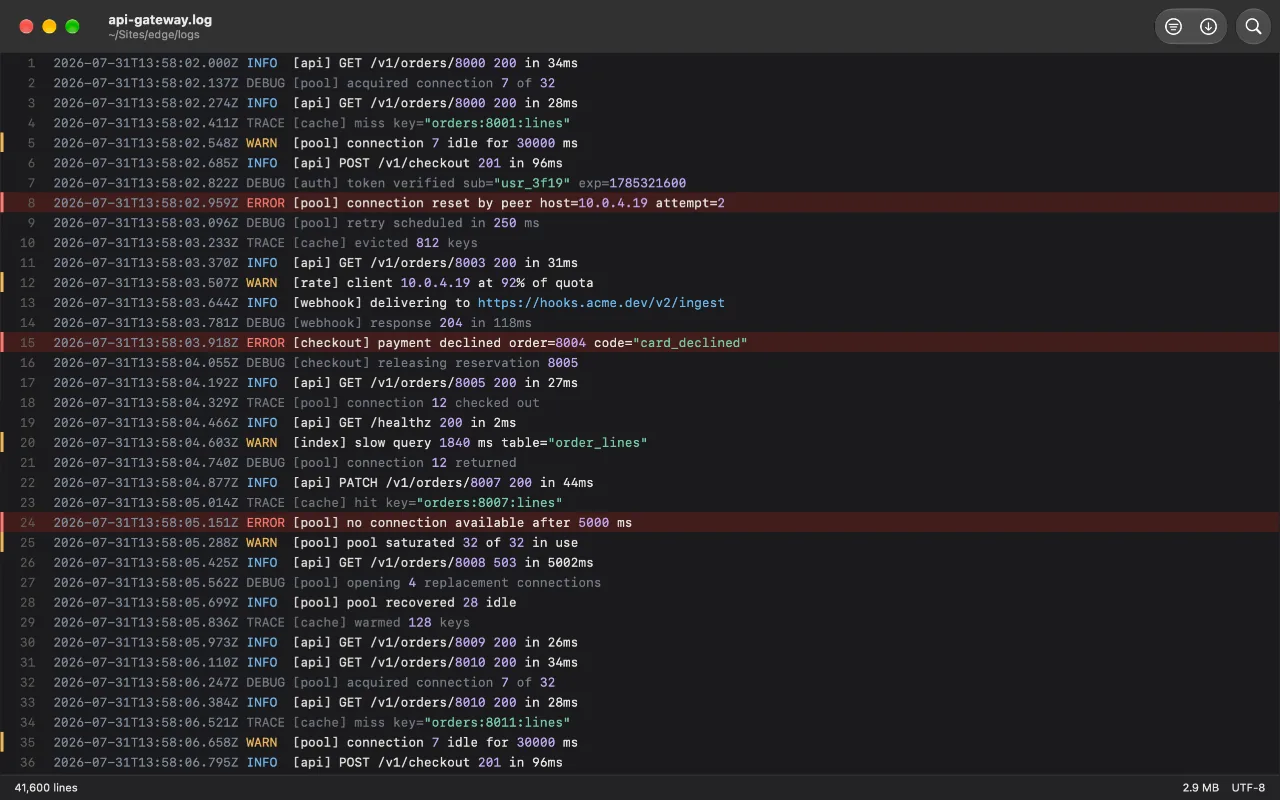


Screenshot 1 of 7: A 41,600-line log, open and scrolling. Severity is visible without reading.
What it does
Filter
Filter, not just search
Search jumps between matches. Filter deletes everything that is not one, keeps the original line numbers, and draws every gap as an explicit break - so you always know what was left out. Optional context lines bring back the surroundings of each match, and Export writes that filtered view to a new file without touching the original.
Follow
Follow a file as it is written
Pin to the bottom and the window follows. Scroll away and it stops, counts the new lines, and waits - it never yanks the view out from under you. Truncation, rotation and deletion are all survived, and named.
ANSI
Reads terminal color instead of printing it
A log captured from docker compose or a CI run carries its color as escape codes, and most viewers show them as text. Log Viewer paints them and hides the codes - and copying gives you back what you could see.
Highlight rules
Severity you can see while scrolling
Errors red, warnings amber, debug receding to the background. The rules are yours: pattern to text color, an optional tint for the whole line, in the order you choose - the first match wins.
Local redaction
Share the log, not its secrets
Choose ordered rules for tokens, emails, and IP addresses. Regular Copy and filtered Export replace matches locally; the open log and original file stay unchanged.
More for reading logs
- Starts with a memory-mapped view. Shows indexed content progressively instead of constructing a fully editable copy of the entire file before you can begin reading.
- Paste a copied log. Press ⌘V to inspect an excerpt copied from a CI page, another web tool or a terminal without first saving a file.
- Survives rotation and truncation. A rotated or replaced file keeps being followed, and says what happened.
- A real Mac app. Light and dark both designed. Native window tabbing, find bar, menus, text sizing.
- Compare two logs side by side. Choose File > Open Beside… for an independent window beside this one. Filter one, follow the other.
- Pick up where you left off. Optionally restore each log's search, Filter, Follow state and reading position when you reopen it.
- Literal and regular-expression queries, with match positions marked on the scrollbar
- Export a completed filtered view - including shown context - to a new file
- Redact tokens, email addresses, and IP addresses locally when copying or exporting a filtered log
- Select across lines by dragging, or whole lines from the gutter, and copy either
- Go to Line reaches a line the filter is hiding, rather than the nearest one it is not
- The same file can be open in as many tabs as you like, filtered differently in each
- Recents that reopen directly across relaunches - and ask for a file back in one click if macOS loses the grant
- Opens files other viewers refuse: invalid encodings, no trailing newline, binary bytes, a single enormous line
FAQ
How large a file can it open?
There is no size limit that comes from the app. It never reads the file - it maps it, indexes line positions in the background, and draws only the lines on screen. A two-gigabyte log opens in milliseconds and uses about as much memory as an empty window.
Can it open system logs in /var/log?
Yes, the same way as any other file: choose it with Command-O - Command-Shift-G takes the panel straight to a typed path - or drop it on the window. The sandbox only rules out the app browsing system folders uninvited; hand it the file once and it reopens from Recents from then on. A few system logs are readable only by root, and no App Store app can change that.
Can I paste logs instead of saving a file first?
Yes. Copy the text, open an empty Log Viewer window and press Command-V. It is opened as a temporary pasted log, not added to Recents, and its private backing file is removed when you close or replace it. For a large or live log, open the original file instead.
Why did a file in my Recent list ask me to pick it again?
It should not, as a rule - opening a file records a grant that survives relaunching. The grant can still die: a file replaced wholesale, a disk remounted, a permission macOS declined to record. When it does, clicking the entry opens a panel already pointed at the right folder, so handing the file back is one click - and the new grant sticks.
What is the difference between Find and Filter?
Find jumps between matches while the rest of the file stays where it is. Filter collapses the file to the matching lines only, keeping their original line numbers and marking every stretch it hid. Filter is usually what you actually wanted.
Can I save just the filtered lines?
Yes. Once the filter has finished, choose Export to save the matching lines - and any context currently shown - as a new file. The original log is never changed.
Can I redact secrets before I share a log?
Yes. In Settings > Redaction, turn on local redaction and adjust the ordered rules for tokens, email addresses, and IP addresses. Regular Copy and filtered Export replace matching values, while the open log and original file remain unchanged. To export every line safely, filter with the regular expression .* and export the redacted view. Read the redaction guide.
Can I compare two log files side by side?
Yes. Choose File > Open Beside… and select the other log. It opens in its own window beside the current one, so its filter, search and Follow state stay independent. When there is room, the windows are arranged side by side; tabs can still be merged or moved into their own window from the Window menu.
Does it follow a file that is being written to?
Yes. Turn on Follow and new lines are indexed as they arrive. If you scroll away it stops moving and shows a count of what has arrived since, so you can go back when you are ready. Truncation, rotation and deletion are all handled without losing what you were reading.
Can I change the colors?
Yes. Settings has an ordered list of rules, each a pattern, a text color, and optionally a tint for the whole line it matches. Add to them, reorder them, edit them or reset them. The first rule that matches wins, so the order is the behavior.
What happens to the ESC[32m codes in a log I captured from a terminal?
They are read, not printed. Log Viewer paints what they asked for and takes the codes out of the text, which on a docker compose log is most of the width of the window back. Settings can also drop them entirely, or leave them visible if what you are debugging is the codes themselves. Your own highlight rules win over what the log asked for, and copying a line gives you what you could see rather than the escape codes you could not.
Does it open compressed logs?
Not yet. A .gz file cannot be mapped or seeked, so supporting it would mean decompressing to a temporary file first - a different experience from the one this app is built around. It is the one feature on the list with a real case for a future version.
Does anything leave my Mac?
No. The app has no networking code at all, no accounts and no analytics. There is nowhere for a log to go.
Guides
- Open log files in Log Viewer from Terminal or FinderOpen logs with Finder, drag and drop, or the macOS open command without bypassing App Store file permissions.
- Redact secrets from a log before sharing it on MacKeep the original readable while making a safe copy or filtered export for an issue, vendor, or teammate.
- Open a huge log file on a MacUse less for a quick read, grep or split for an extract, or a memory-mapped viewer for browsing and filtering.
- Follow a live log file on a MacUse tail -f for appended lines, tail -F for rotated files, or a GUI for searchable live logs.
- Remove or display ANSI codes in a logDisplay ANSI colors with less -R, remove common codes with sed, or open the file in a viewer that renders them.
- Filter a log file on a MacUse grep for a quick extract, or filter the file in place when you need context and navigation.
- Paste logs into a Mac appCopy a small log excerpt, paste it into a graphical viewer, then search and filter it without making a file first.
- Log viewers for Mac comparedConsole, BBEdit, VS Code, lnav, klogg, less and Log Viewer side by side, with what each is actually good at.
Get Log Viewer
Free, and it opens anything.
 (opens in a new tab)
No data or personal information is collected by this app · Contact support
Support small, independent apps
If Log Viewer has been useful to you, you can support more small apps like it.
 Buy me a coffee