To open a very large log file on a Mac, start with less in Terminal. It reads the file incrementally instead of building a fully editable document in memory. If you need a smaller extract, use grep or split. If you need search, filtering and live updates in a graphical app, use a viewer designed for large files.
The best method depends on whether you need a quick read, a smaller copy or an interactive view of the original file.
Option 1: open the log with less
less is included with macOS and reads incrementally rather than constructing an editable document. Opening speed still depends on the file, storage and command options:
less /path/to/app.log/pattern searches forward, n repeats the search, G jumps to the end, q quits. For a quick look at a big file, this is the honest baseline - and if the log came from a terminal with color codes in it, less -R will even render them.
The installed macOS 27.0 less manual documents &pattern filtering, which displays only matching lines until you enter an empty & filter. less also searches match to match; it does not provide Log Viewer’s persistent original-line gutter, colored severity overview, or structured filtered export.
Option 2: extract or split the log
If you already know what you are looking for, extract it before opening anything:
grep -n "ERROR" app.log > errors.logAdd -C 3 for three lines before and after each match, or use -B and -A for different leading and trailing context. These options were verified against the installed macOS 27.0 grep manual. For an interactive view that keeps original line numbers, see filter a log file on Mac.
or split the file into pieces any editor can handle:
split -b 200m app.log chunk-Both create a derived view. grep can include context, but the output is still a separate stream; split creates pieces whose local line positions no longer equal the original file’s line numbers. Keep the original as the authority.
Option 3: use a large-file log viewer
Log Viewer memory-maps the file and publishes a first nonempty line-index snapshot before full indexing completes. Full-file search waits for a complete index; filtering and search are different from merely showing the first readable content. You can filter while preserving original line numbers, color common severity levels, and follow a file that is still being written.
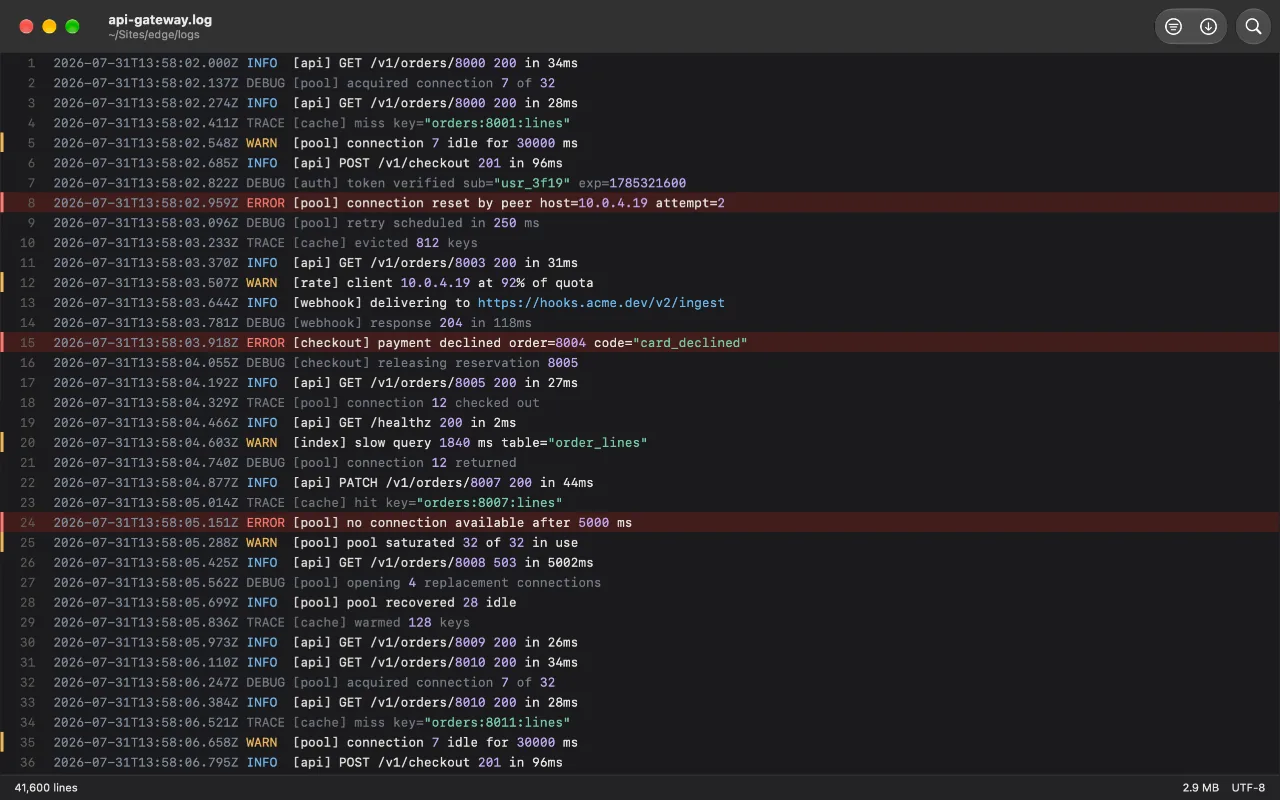
It's free on the Mac App Store, with no accounts and no network access - the log never leaves your Mac.
Before sharing an extracted log, review the redaction guide. Redaction changes copied/exported text, not the source file.
Open logs in Log Viewer from Finder or Terminal
Double-click a log in Finder, drag it onto Log Viewer, or choose File > Open… in the app. From Terminal, use macOS’s open command. It hands the file to the installed app in the same way Finder does, including the permission the App Store version needs to read it:
open -a "Log Viewer" /path/to/app.logOpen several logs or control the launch
Put more paths after the app to open several logs. The app opens them using its normal tab and window behavior:
open -a "Log Viewer" ~/Logs/api.log ~/Logs/worker.logAdd -g to leave Log Viewer in the background, -F to launch without restoring saved window state, or -W when a shell script should wait until the app quits. Use File > Open Beside… inside Log Viewer when a particular log belongs in a separate window. The Terminal command opens files, but does not set Filter, Follow, or a tab-versus-window destination.
FAQ
Why does TextEdit take so long to open a large file?
A general-purpose editor may decode, index and build an editable text model before it becomes responsive. Exact behavior depends on the editor and file; the practical distinction is whether you need editing or an incremental read-only view.
Can Console.app open large log files?
Console is designed around Apple’s unified logging system and can also open some log files. Choose it for unified logs rather than treating it as a general-purpose viewer for arbitrary large plain-text files.
Is there a file size limit?
No fixed app limit is advertised, but practical limits still come from address space, storage, indexing time and malformed input.